
Why determinism matters
A multiplayer game can keep players in sync in two ways: send the game state, or send only the inputs. Sending state gets expensive once a game has hundreds of moving units. Sending inputs is far cheaper: every machine runs the same simulation, and only the players’ button presses cross the network. Lockstep and rollback netcode, common in strategy and fighting games, are built on that idea.
It only works if the simulation is deterministic: the same inputs must produce bit-identical state on every machine, every tick. One float rounded differently, one list walked in a different order or one read of the clock, and the two machines quietly fork into different games. That is a desync, and it usually surfaces minutes after its cause, which makes it hard to reproduce. So determinism has to be designed in and measured, not assumed.
What this project is
This is a toy project and a proof of concept for two of my libraries. Deterministic Path Finding is my fixed-point navmesh pathfinding and avoidance library for lockstep and rollback games. Tickwise records deterministic simulations and finds the first tick where two runs diverge. I wanted to see both working in a real peer-to-peer game.
So I built a small Unity 6 game around them: two players, peer-to-peer rollback over FishNet, every cube moved by Deterministic Path Finding, and every confirmed tick recorded with Tickwise so the two machines can be checked against each other.
The game
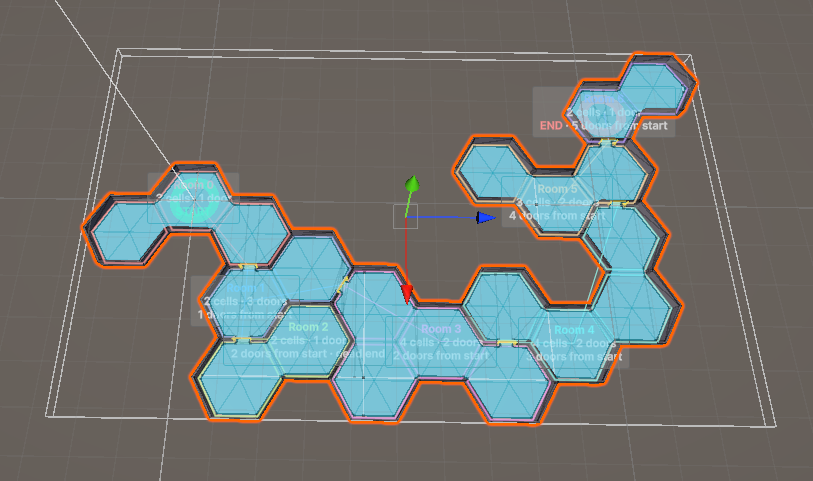
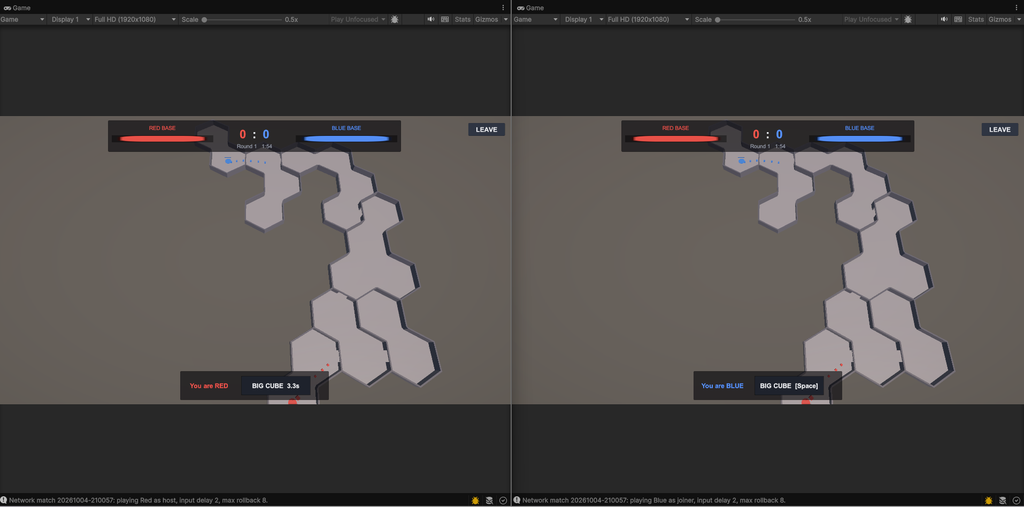
Red and blue each defend a base at opposite ends of a generated seven-room level. Small cubes spawn at every base once a second, march to the enemy base and fight any enemy cube they meet. A cube that reaches the enemy base explodes and damages it by its remaining health.
Each player has one input: a big cube, on a five-second cooldown. A destroyed base scores a point for the other side; after two minutes the healthier base wins the round, then the bigger army. One button keeps the input stream tiny, which makes every rollback easy to follow.
How it works
Each peer runs the whole game; FishNet carries nothing but inputs. The code is split into layers that only depend downward, and the bottom three have no Unity references, so they run in plain .NET tests and replays.
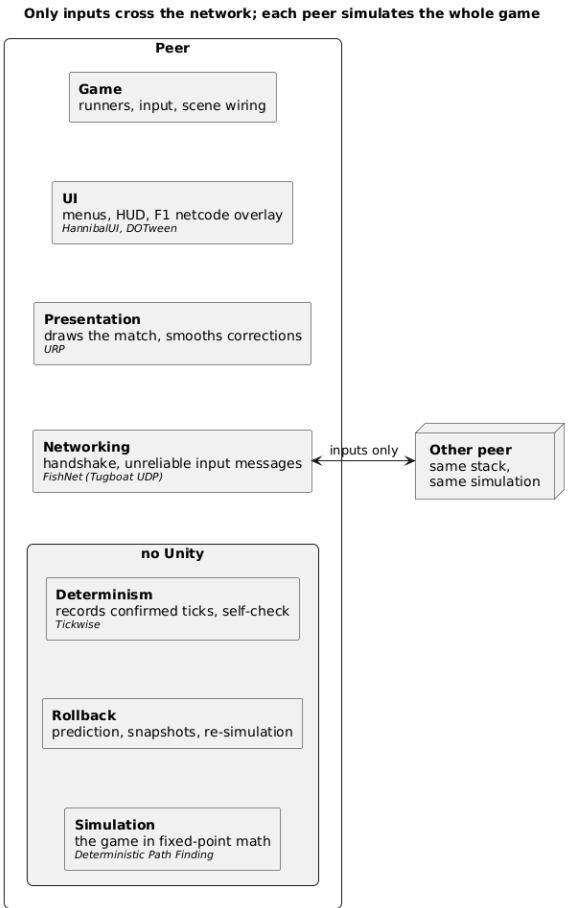
One peer’s layers; the other peer runs the same.
- Simulation. Fixed-point math, a navmesh, flow fields and ORCA avoidance from Deterministic Path Finding, on a level generated once in the editor with Connected Rooms Generator. The whole state is packed structs, so a snapshot and a hash are raw memory copies.
- Rollback. Local input applies two ticks late; a missing remote input is predicted as “no button”. When the real one differs, the peer restores the snapshot before that tick and re-simulates, up to eight ticks back.
- Networking. FishNet is only the transport: the host runs a server, the joiner is its single client, and a handshake checks both run the same rules and level.
Proving it with Tickwise
Each peer records its confirmed ticks with Tickwise: both players’ inputs and a state hash every tick, a full hash every 30 ticks and a field-by-field state dump every 150. A tick is recorded only once both real inputs are known and it will never be re-simulated, so two peers’ files compare tick for tick.
In a 10.5-minute ParrelSync session with 17% simulated packet loss and 28% out-of-order delivery, the host rolled back 337 times. tickwise compare still reported both recordings identical over all 19,012 ticks.
To show what a desync looks like, the sample can plant a realistic bug on one peer: new cubes take their spawn offset from the wall clock. Tickwise caught it at once:
verdict  first divergence at tick 301, caught by the light hash,
         confirmed by the full hash at tick 330, last agreement at tick 300
tick 450  41 differences over 979 fields
  exact   units[22].position.x: 652157 versus 670993
  exact   units[22].position.z: 602776 versus 668612
Tick 301 is the first spawn after the bug was planted, and the diff names the cubes it moved. An editor window shows the same verdict and a sortable table of the differing fields.
Hiding rollback on screen
A correct rollback still looks wrong if cubes teleport. The presenter watches every simulated tick, re-simulations included, so it always draws cubes between the corrected positions of the last two ticks.
- Corrections glide. When a rollback moves a cube it has already drawn, the jump becomes an offset that halves every 50 ms. Jumps over 3 m snap.
- Wrong predictions fade. A cube that existed only in a mispredicted timeline fades out; one a correction reveals fades in.
- Effects play once. Deaths and base explosions fire when a cube is really removed, not each time a tick is re-simulated.
Try it
You need Windows, Unity 6000.3.11f1, Git LFS and Rust 1.88 or newer (to build the Tickwise native library). The README walks through the one-time setup: install DOTween, build Tickwise, open the scene.
- Run Netcode Sample > Set Up Network Match Scene.
- Create a clone in ParrelSync > Clones Manager and open it.
- Press Play in both editors: the original hosts as red, the clone joins as blue.
- Press Space for big cubes, F1 for the netcode overlay, and plant chaos on one peer if you like.
- Stop both and open Netcode Sample > Tickwise > Comparison Window to compare the two recordings.
The code, setup steps and architecture notes are on GitHub: https://github.com/cosgunhalil/Netcode-Sample